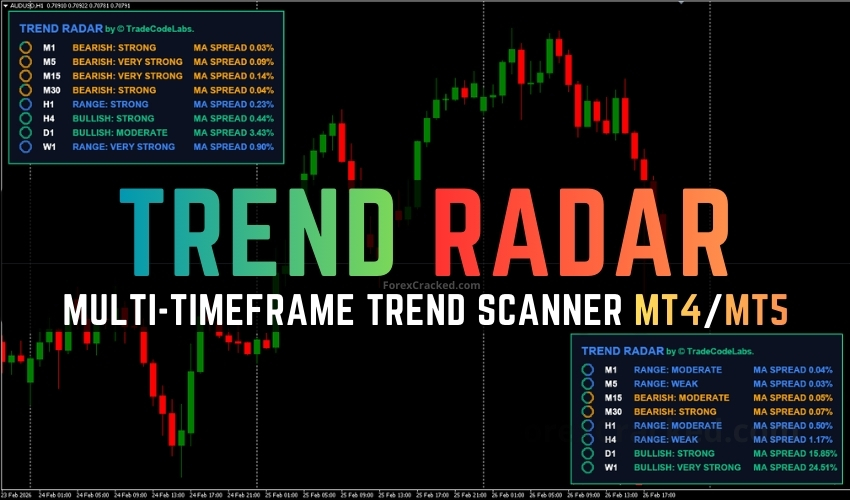
Overview of Trend Radar Indicator
The Trend Radar is an advanced multi-timeframe trend scanning dashboard designed for MetaTrader 4 (MT4) and MetaTrader 5 (MT5). It enables traders to monitor trends across eight different timeframes simultaneously, from M1 to W1, and offers insights into trend direction and momentum strength on a single on-chart panel.
Features of Trend Radar
- 8-Timeframe Monitoring: Scans M1, M5, M15, M30, H1, H4, D1, and W1.
- Dual-Filter Validation: Utilizes moving average crossovers with ADX momentum confirmation.
- Visual Momentum Rings: Provides instant trend assessment with dot-based rings filling proportionally to ADX strength.
- Non-Repainting Signals: Set to ClosedBar mode to ensure signals do not change retroactively.
- Customizable Settings: Adjust Fast/Slow MA periods, MA types, and ADX parameters for each timeframe.
- Repositionable Dashboard: Easily move the dashboard to any corner of the chart.
- Pop-up Alerts: Get terminal notifications when trend conditions change.
Installation Steps
- Download the Trend Radar indicator file.
- Open your MetaTrader platform (MT4 or MT5).
- Navigate to File > Open Data Folder and place the downloaded file in the MQL4/Indicators or MQL5/Indicators folder.
- Restart the MetaTrader platform.
- Drag and drop the Trend Radar indicator onto your desired chart.
How to Use Trend Radar
Timeframe Alignment Strategy
- Attach to Your Trading Chart: Load the indicator on your main trading timeframe.
- Check for Alignment: Look for alignment in higher timeframes (e.g., H1, H4, D1) to identify high-confluence setups.
- Trade in the Direction of Alignment: Enter trades on the lower timeframe that align with the higher timeframe trend.
- Use the Momentum Rings: Ensure the rings on H1 and H4 are filled, indicating strong momentum.
- Avoid Mixed Signals: Stay out of trades if lower and higher timeframes disagree.
The Trend Radar can be used for Forex currency pairs and other assets such as stocks, commodities, cryptos, and more. It is suitable for traders of all experience levels, but practicing on a demo account is recommended before going live.